
School Examination Management Software

Keep the exam schedule, admit cards, marks and results in one examination workspace. Give coordinators and assigned staff a clear view of what is ready and what still needs review.

Book a demo
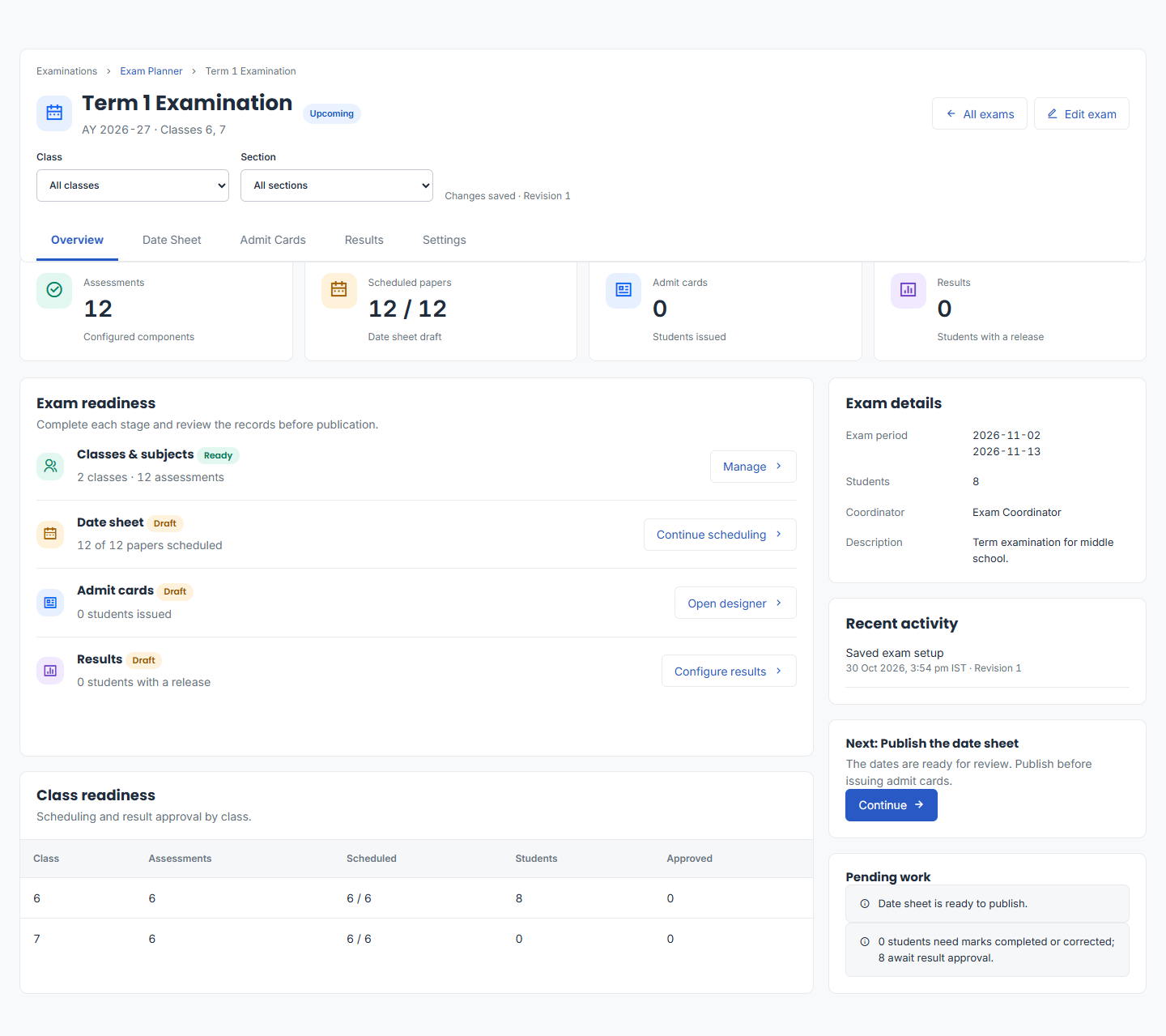
Exam Planner overview for a sample term examination, with date sheet, admit cards, results and readiness checks.
Exam Planner overview with a sample term examination. Open the image to view the full-size interface.

Build the exam around classes and papers

Set the academic session, exam dates and participating classes. Configure papers with subjects, marks and scheduled times so the coordinator can review the whole examination before publishing the date sheet.

  • Define subjects, components and maximum marks.
  • Assign paper dates, times and rooms.
  • Review scheduling readiness before publication.

Publish the schedule, then prepare admit cards

The workflow separates a draft schedule from a published one. Admit-card issuance follows schedule publication, giving staff a clear sequence for preparing and issuing exam documents.

  • Review and publish the date sheet.
  • Configure admit-card design and instructions.
  • Issue documents for the students included in the exam.

Review marks before releasing results

Assigned staff enter marks within their access. Reviewers check results before publication. Changes to marks or result rules require renewed approval, helping the school keep review and release as distinct steps.

  • Enter marks or validate an import before saving it.
  • Review calculated totals, grades and approval status.
  • Publish approved results or choose a scheduled release.

Make the demo about your school.

Bring a date sheet, grading rules and a sample report card without student details. We can demonstrate the path from exam setup to reviewed results.

Discuss pricing and implementation

Questions before you choose.

Can every teacher edit every exam?

Access depends on examination permissions and assignment. Exam administrators, coordinators, reviewers and assigned staff have different responsibilities within the workspace.

Can results be released without approval?

The publishing workflow requires the necessary marks and approval checks. A change that affects the approved result requires review again before publication.

Can we use our own grading and report format?

Exam settings include grading and pass rules, while admit-card and result settings control supported document options. Bring your current report format so the team can confirm what fits and what needs customization.

What happens when a published result needs correction?

The workflow preserves previously published document versions when an approved correction is published. Review the correction process and access responsibilities during implementation.

Let’s see how it fits
your school.

A conversation about your team, your routines and your next step.

Book your ERP walkthrough